
WordPress Security Alert Emails: How We Fixed a Real REST API Vulnerability
October 30, 2025

It is peak scammer season.
Every year around the holidays, inboxes fill with fake WordPress security alerts, phishing attempts, and extortion-style vulnerability reports. Most of them are junk, but sometimes they accidentally point to something real.
WordPress REST API User Endpoint: A Common Security Exposure
Recently, one of our clients received an email claiming their site had a security flaw. The message looked like spam at first glance—broken grammar, vague threats, and a “proof of concept” screenshot. When we reviewed it, we found that the data they referenced was legitimate.
The lesson was not panic. It was prevention.
The So-Called Vulnerability
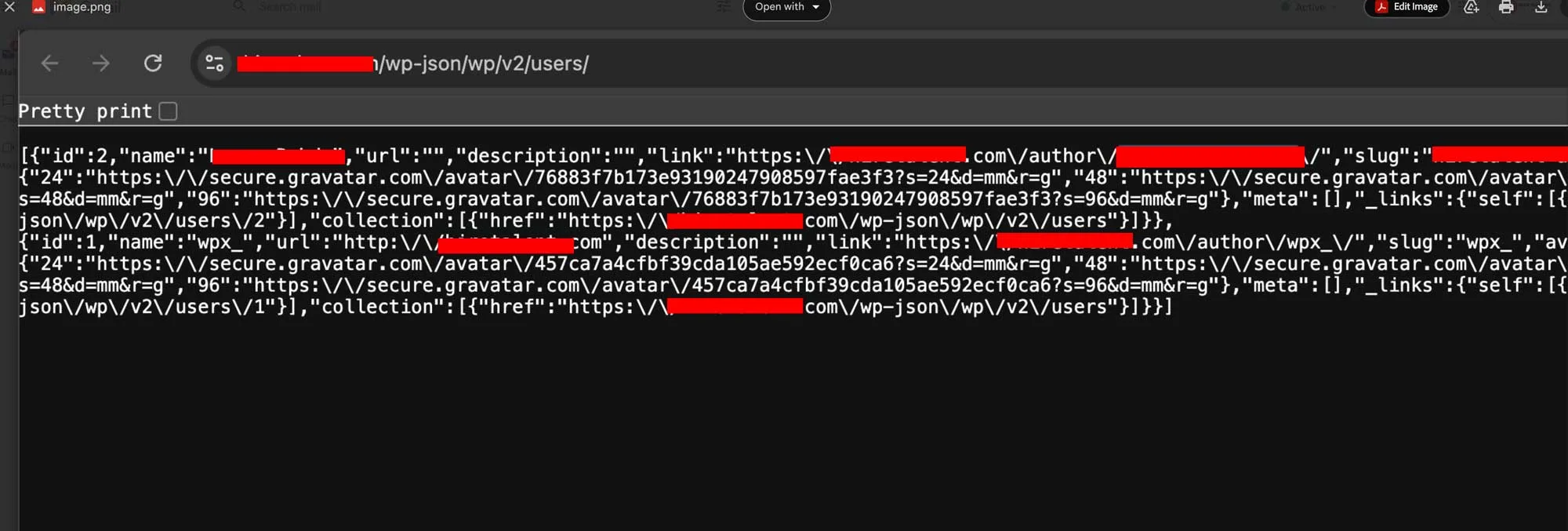
Screenshot demonstrating the /wp-json/wp/v2/users/ endpoint exposure in WordPress.
The sender pointed to a public endpoint at:
/wp-json/wp/v2/users/
This endpoint is part of WordPress’s REST API, a structured interface designed for developers to connect data between applications. By default, it publicly lists all site authors, including their display names and slugs.
That means anyone can access URLs like https://example.com/wp-json/wp/v2/users/ and see basic user information. No passwords. No private data. But enough to give attackers a head start in identifying admin usernames. Kinda scary, right???
Why This Can Be Dangerous
When attackers know a site’s usernames, they can:
- Attempt brute force logins on /wp-login.php—automated attacks that repeatedly try to guess passwords to gain access to your WordPress administration screen.
- Run automated credential stuffing attacks, where stolen username and password pairs from data breaches are tested across multiple sites to fraudulently gain access to user accounts.
- Target the same credentials across multiple sites
According to research, brute force attacks on WordPress sites have surged by 60% over the past year, and some attack campaigns have peaked at over 14 million attempts per hour. It is not a breach. It is an exposure. And for bots running 24 hours a day, that is all they need.
What We Did for the Client
We secured the site immediately and applied several best practices that every WordPress site should have in place:
1. Restricted REST API access
Disabled the /wp/v2/users endpoint for unauthenticated visitors. Add this code to your theme’s functions.php file or a site-specific plugin:
add_filter('rest_endpoints', function ($endpoints) {
    if (isset($endpoints['/wp/v2/users'])) {
        unset($endpoints['/wp/v2/users']);
    }
    if (isset($endpoints['/wp/v2/users/(?P<id>[\d]+)'])) {
        unset($endpoints['/wp/v2/users/(?P<id>[\d]+)']);
    }
    return $endpoints;
});
2. Hardened login security
- Changed the login URL using WPS Hide Login
- Added Limit Login Attempts Reloaded to block automated bots
- Enabled two-factor authentication for all admin users
3. Reviewed and updated everything
- Updated WordPress core, themes, and plugins
- Scanned for vulnerabilities using Wordfence
- Verified backups and restoration points were working
How Businesses Should Handle Security Alert Emails
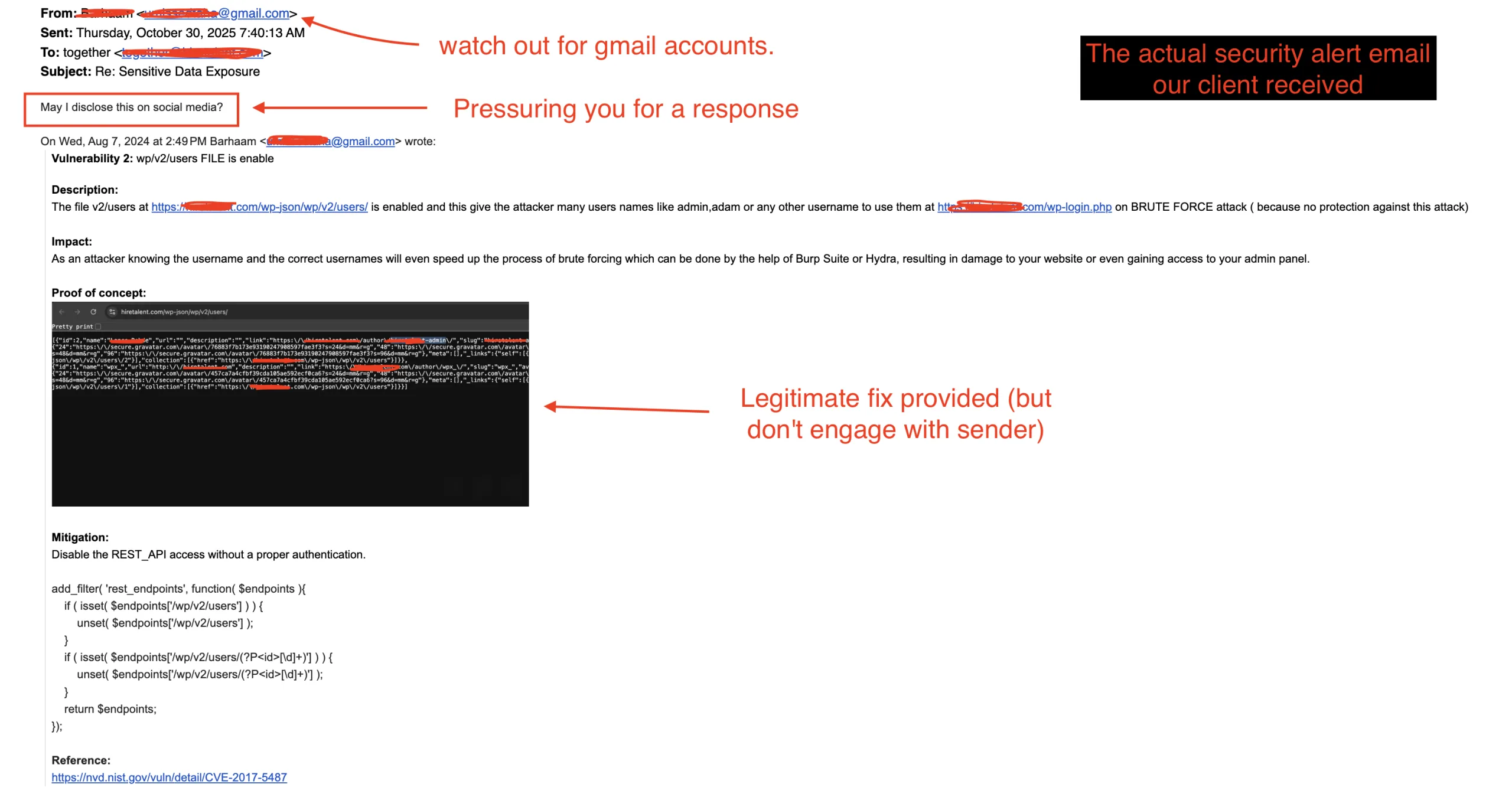
If you or your clients get an email like this, follow these steps:
- Do not reply or click anything. They could be cloaked links, designed to intercept any personal information from you. Many senders are scammers fishing for attention or trying to verify your email address is active.
- Verify the sender’s legitimacy. Check the sender’s domain and look for signs of spoofing or impersonation.
- Check the claim yourself. Visit the URL carefully or ask your web team to verify it in a secure environment.
- Patch or disable the endpoint if valid. Even small exposures can attract brute force bots.
- Document and move on. There is no reason to engage or pay for disclosure.
Key Takeaway
The holidays bring more than online shoppers. They bring scammers too. And while most alerts are noise, the occasional one highlights a real issue that is easy to fix if you know what to look for.
Here’s the good news: WordPress core itself is remarkably secure, accounting for only 4% of all security vulnerabilities. In 2024, only seven vulnerabilities were found in WordPress core itself, and none were significant enough to pose a widespread threat. The vast majority of security issues come from third-party plugins and themes—which means with proper management, monitoring, and regular updates, your WordPress site can be highly secure.
At Neon Flamingo Creative, we help clients identify and close these small gaps before they become serious problems. If your WordPress site has not had a security review in the last 6 months, now is the time.